
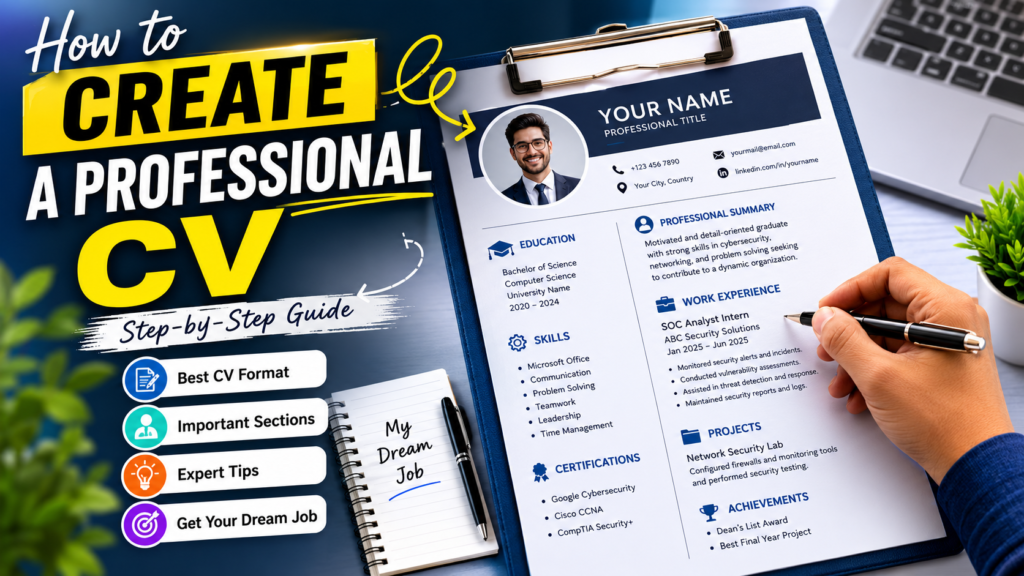
A CV is likely to be the first point of contact between you and your potential employer. If you are just out of college or an experienced professional or are even making a career shift, writing an impressive CV could help you get an interview invite. With this guide, you will get to know the process of How to Create a Professional CV in 2026
am job in 2026.
Basic Information for How to Create a Professional CV in 2026
| Information | Details |
|---|---|
| Topic of the Article | How to Prepare a Professional CV |
| Suitable For | Students, Fresh Graduates, Professionals |
| Difficulty Level | Beginner to Intermediate |
| Optimum Length of CV | 1-2 Pages |
| Best Format | Reverse Chronological |
| Purpose | Job Applications & Career Growth |
| Last Updated | 2026 |
What Is a Professional CV?
Curriculum vitae is the description of an individual’s qualifications, education, achievements, skills, and experiences in his/her life. It is used by employers to see whether an individual is fit for a particular position.
A professional CV should be:
- Readable
- Grammar error free
- Neatly formatted
- Up-to-date
- Attractive
Why Is a Professional CV Important?
Your resume functions as your personal marketing tool. The recruiter usually takes just a few moments to assess your resume before moving on.
A strong CV helps you:
- Create an impressive first impression
- Demonstrate your credentials
- Emphasize your accomplishments
- Get more interview calls
- Outshine other applicants
Step-by-Step Guide How to Create a Professional CV
Step 1: Include Contact Information
Start your CV with accurate contact details.
Include:
- Full Name
- Mobile Number
- Professional Email Address
- City and Country
- LinkedIn Profile
- Portfolio Website
Contact Details Example
| Detail | Example |
| Full Name | Muhammad Ali |
| Phone Number | +92 300 1234567 |
| Email Address | muhammadali@email.com |
| Location | Karachi, Pakistan |
| linkedin.com/in/muhammadali | |
| Portfolio | www.muhammadali.com |
Step 2: Write a Strong Professional Summary
A professional summary is a short introduction at the top of your CV.
Example
“A motivated individual with comprehensive understanding of cybersecurity, networking, and software development looking for new opportunities where I can utilize my technical abilities for organizational success.”
Keep it:
- Short
- Relevant
- Achievement-focused
- 3-5 lines long
Step 3: Highlight Your Work Experience
List your work experience in reverse chronological order.
Include:
- Job Title
- Company Name
- Employment Dates
- Key Responsibilities
- Achievements
Example
SOC Analyst Intern
ABC Security Solutions
January 2025 – June 2025
- Monitored security alerts and incidents.
- Conducted vulnerability assessments.
- Assisted in threat detection and response.
- Improved incident response documentation.
Step 4: Add Your Educational Background
Employers want to know your academic qualifications.
Example
Bachelor of Science in Computer Science
University of Karachi
2022 to 2026
Relevant Courses:
- Cybersecurity
- Network Security
- Database Management
- Software Engineering
Step 5: Showcase Your Skills
Skills are one of the most important sections of a CV.
Technical Skills
- Microsoft Office
- Networking
- Cybersecurity
- Python Programming
- Database Management
- Linux Administration
Soft Skills
- Communication
- Teamwork
- Problem Solving
- Leadership
- Time Management
- Critical Thinking
Step 6: Include Certifications
Certifications demonstrate your commitment to professional growth.
Examples
- Google Cybersecurity Certificate
- Cisco CCNA
- CompTIA Security+
- Microsoft Azure Fundamentals
- AWS Cloud Practitioner
Step 7: Add Projects and Achievements
Projects help showcase practical experience.
Example Projects
Network Security Lab
- Configured firewalls and network monitoring tools.
- Performed penetration testing exercises.
Portfolio Website
- Developed a personal website using HTML, CSS, and JavaScript.
Achievements
- Deans List Award
- Academic Excellence Scholarship
- Coding Competition Winner
Step 8: Include References
You may include:
References available upon request
Or provide references if specifically requested by the employer.
Best CV Formatting Tips
A professional-looking CV should have:
Use Simple Fonts
- Calibri
- Arial
- Times New Roman
Font Size
- Headings: 14–16
- Body Text: 10–12
Keep Consistent Formatting
- Uniform spacing
- Proper alignment
- Consistent bullet points
Save as PDF
Always submit your CV in PDF format unless instructed otherwise.
Final Thoughts
Building an effective CV is one of the most crucial processes that you will go through in building your career path. With a good CV, you not only get to showcase your strengths but also prove your qualifications. You should take time and effort to tailor your CV to the requirements of each job and ensure that you emphasize your accomplishments.
FAQs
1. What makes a CV look professional?
A professional resume is clear, organized, and readable. It should have accurate data, a neat format, proper skills and experience related to the position you are targeting.
2. Can I create a professional CV without any work experience?
Yes, definitely. As a student or a fresh graduate, concentrate on your educational background, internships, volunteer activities, certificates, projects, skills, and so on. Any employer knows that one must start somewhere.
3. How often should I update my CV?
It is advisable to regularly revise your resume every few months if you acquire new skills, certificates, jobs or achievements. This will save your time in the future.
4. Is it okay to use a CV template?
Yes, creating your resume according to a professional template may be useful. Just try not to make it complicated and distracting.
- Best Way How to Create a Professional CV in 2026 – Complete CV Writing Guide
- How to Prepare for CSS Exam Preparation 2026 Pakistan – Complete Study Plan & Tips
- PPSC Assistant Director Jobs 2026 in Pakistan | Apply Online & Eligibility Criteria
- Best Penetration Tester Jobs 2026 Pakistan – Salary, Skills & Career Guide
- Best FPSC IT Specialists Jobs 2026 Pakistan | Latest Federal IT Vacancies